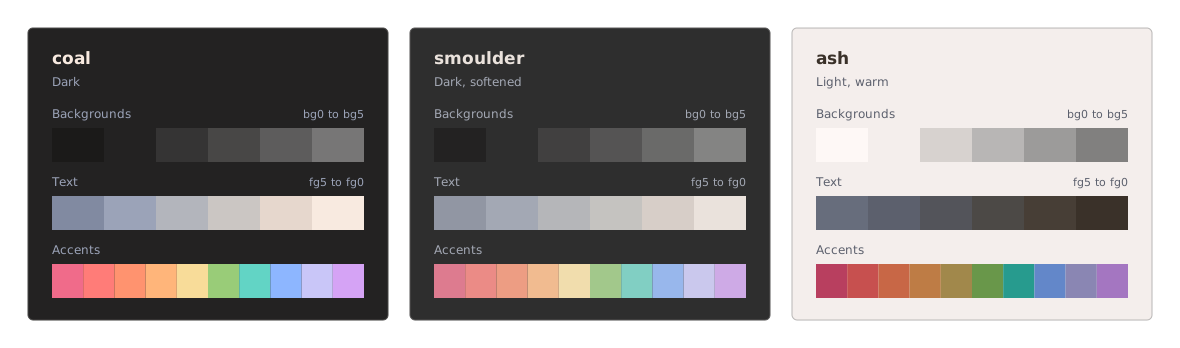
All three variants, with Hex, RGB, HSL, and OKLCH side by side.
Colour names and numbering
Background colours run from bg0 to bg5, and text colours from fg5 to fg0. bg0 is the darkest background in Coal and Smoulder, and the lightest in Ash.
The examples are using bg1 for backgrounds and fg1 for body text but you can try any fg-bg combination.
You can find each colour’s hex, RGB, HSL, OKLCH, and CSS names in the JSON file.
Coal
Dark, with neutral backgrounds and text shades that range from cool to warm.
22 colours
Colour
Name
Hex
RGB
HSL
OKLCH
bg0
bg1
bg2
bg3
bg4
bg5
fg5
fg4
fg3
fg2
fg1
fg0
rose
ember
coral
apricot
honey
fern
verdigris
cornflower
lilac
orchid
Smoulder
A softer dark variant with gentler contrast and accents.
22 colours
Colour
Name
Hex
RGB
HSL
OKLCH
bg0
bg1
bg2
bg3
bg4
bg5
fg5
fg4
fg3
fg2
fg1
fg0
rose
ember
coral
apricot
honey
fern
verdigris
cornflower
lilac
orchid
Ash
A light variant with warm backgrounds and softer accents.
22 colours
Colour
Name
Hex
RGB
HSL
OKLCH
bg0
bg1
bg2
bg3
bg4
bg5
fg5
fg4
fg3
fg2
fg1
fg0
rose
ember
coral
apricot
honey
fern
verdigris
cornflower
lilac
orchid
Suggested uses
Some examples for interfaces, code, and terminals.
Token
Interface examples
Code and other examples
Inset surfaces
Code blocks and terminal panes.
Page background
Editor and terminal backgrounds.
Cards and controls
Active lines and selected rows.
Borders and dividers
Split separators and guides.
Inactive fills
Line numbers, gutters, and whitespace marks.
Subtle controls
Comments, delimiters, and punctuation.
Muted text
Low-priority annotations.
Labels and captions
Status text and annotations.
Supporting text
Less prominent editor text.
Secondary text
Secondary editor text.
Body text
Text, variables, and terminal foreground.
Headings
Bright terminal white and emphasized results.
Accent and cursor
Regex and escape sequences.
Errors
Diagnostics and deleted content.
Secondary accent
Parameters, markup tags, and deprecated symbols.
Warm highlights
Numbers and constants.
Warnings
Types, classes, and attributes.
Success
Strings and added content.
Info and hints
Operators and hints.
Links
Functions, methods, and properties.
Focus and selection
Matching brackets and marks. Selection can use a low-opacity tint.
Alternate accent
Keywords and control flow.
More examples
Syntax
Comments, punctuation
bg5
Text, variables
fg1
Keywords, control
orchid
Functions, properties
cornflower
Strings
fern
Numbers, constants
apricot
Types, classes, attributes
honey
Operators
verdigris
Parameters, tags, deprecated
coral
Regex, escapes
rose
Diagnostics & diffs
Error
ember
Warning
honey
Info, hint
verdigris
Success
fern
Added
fern on diff-add
Removed
ember on diff-remove
Modified
orchid on diff-modify
−timeout: 15,
~timeout: 30,
+retries: 2,
Terminal ANSI
Black
bg0
Red
ember
Green
fern
Yellow
honey
Blue
cornflower
Magenta
orchid
Cyan
verdigris
White
fg1
Bright black
bg5
Bright red
coral
Bright green
fern
Bright yellow
apricot
Bright blue
lilac
Bright magenta
rose
Bright cyan
verdigris
Bright white
fg0
Accessibility
All six fg shades reach at least 4.5:1 contrast against bg1. However contrast will change with the background and opacity, so some combinations might end up with lower contrast, especially in Ash.
You can check and compare the contrast and play around with combinations with different backgrounds, colours, and opacity levels in Playground.
 GitHub